
Hi! Long time, no see.
Today’s post is going to be a little different. I’ve mentioned previously that I started streaming to improve my public speaking while I continue to look for a new full-time job. (still searching haha help me) I’ve shown my PNG models that I use in lieu of a face cam and one of the biggest streaming goals I’ve made for myself was to make my own vtube model.
What is V-tube/V-tuber?
Wikipedia
A VTuber, or virtual YouTuber, is an online entertainer who uses a virtual avatar generated using computer graphics. Popular V-tubers include IronMouse, Shxtou and Shylily. Many of these big names are often backed up agencies such as hololive or VShojo and have massed fans into the million brackets. However, anyone can be a vtuber with just downloading a program like V-tube Studio and using a pre-made model.
I hope that summary was enough for anyone who isn’t familiar with the concept. I know my family wasn’t when they saw me making my own model. So, you’re probably thinking, Zaheerah, why didn’t you just use one of the hundreds of pre-made models available on the internet?
Well, yes, I could’ve definitely found one online, but I found the idea of designing my own model and rigging the model using Live2D a fun challenge to myself artistically. I picked up digital art after years away during the lockdown and never really branched nor challenged myself to improve, so the idea of making my own vtube model was a fun hobby to give me a break from the gloomy job-searching process.
Just a heads up, this isn’t a tutorial post. If I had to teach anyone the stuff I’ve learnt, I would’ve failed miserably. But instead, I wanted to share the resources that helped me make my first v-tube model. There are SO many tutorials out there, and it can get overwhelming to find which one can be beneficial to learn from. I’ve watched so many, and while they all do teach the same things, I found that certain videos were just made more beginner-friendly than others. Since I drew my model myself, these tutorials won’t include any of how to make a model stuff. (sorry!) However, I am in the process of making version two of my V-tube model now that I understand the basics properly. (You can follow me on Twitch, where I’ll be basically starting from scratch on stream, so feel free to come watch me struggle again, lol – if you’re reading this the day I post, hey! I’m probably live playing Baldur’s Gate 3)
What is Live2D
According to Wikipedia, Live2D is an animation software that can be used to generate real-time 2D animations—usually anime-style characters—using layered, continuous parts based on an illustration, without the need of frame-by-frame animation or a 3D model.
Wikipedia
Separating your model for Live2D
I made my model using Procreate, but this tutorial from Mari Yume was SO helpful in figuring out how to separate my model and what was best for when you eventually import it into live 2D.
Inkugaki has a completed Vtube series on YouTube, starting from character preparation all the way to Vtube studio setup. I highly recommend this entire series; I’ll link his video again later, but super helpful for simple models.
Model Rigging
OKAY! Here I am going to show a bunch of different tutorials on rigging certain body parts of your model. All from different content creators. They all do the same thing, but depending on how you’ve designed your model, I found it easier to follow a tutorial that was using a model that was similar to my own as it was easier to figure out how to replicate their actions. Because this was my first time making a model I didn’t go all out on rigging, and only focus on blinking, mouth and hair movement. I chose not to do head turning on this model as in my test run that was the only thing I couldn’t figure out 100% but I will make a part two to this post when I complete my work on my second model.
Eye Rigging
This video was Fennryn was A LIFESAVER. Like seriously, her explanations are so simple, and her video reference was really easy to replicate. She also streams on Twitch while working on models and often answers questions about rigging, which I found super helpful to watch while I figure out certain bits. She is currently posting a full rigging tutorial series on YouTube, which isn’t complete yet, but I will be following hers when I work on Version 2 of my model.
Another Inkugaki video. I ended up simplifying my eyes a lot, so I decided to check out Inkugaki’s video, as he uses a simple model for his reference. Content-wise, it was basically the same, but Fennryn dives into the nitty gritty eye-detail parts that come with having more detailed models. Again, both are so helpful to use as references when rigging my own eyes.
Mouth Rigging
For the mouth, this tutorial from Chupuko was the one I used to learn how to rig mouths in Live2D. However, I did use a different guide, which was from Kira Omori’s mouth rigging tutorial. (https://www.youtube.com/watch?v=tJdS1G5ybkE&t=180s) Mouth rigging was the first thing I learned to do on Live2D, as I thought it would be the hardest thing to figure out. Turns out, from my experience, it was the easiest! And again, these two videos were super informative and great to watch side by side when rigging my own model.
Again, another helpful video was this one from Enma Akatsuki. My model is a tiger girl, so I chose to give her sharp teeth, and this one was just a good reference for me to figure out the teeth placement.
Hair Physics
Hair physics was the hardest thing for me to learn. I made the mistake of not doing a good job when it came to designing and cutting my model’s hair, so I unintentionally made it difficult for myself, but I am working on making it easier for my second model. While all the creators I mentioned above do have hair videos, the one that was the easiest for me to learn the basics from was Inkugaki. I did later return to Fennryn’s video to fix the issue I had with the corners of the hair. I did make some shortcuts, which definitely show in the final version, but I intend to fix all the issues I had in version 2 of my model.
So, that’s all the tutorials I used to make my model. And now I can finally show you version 1 of my V-tube model!
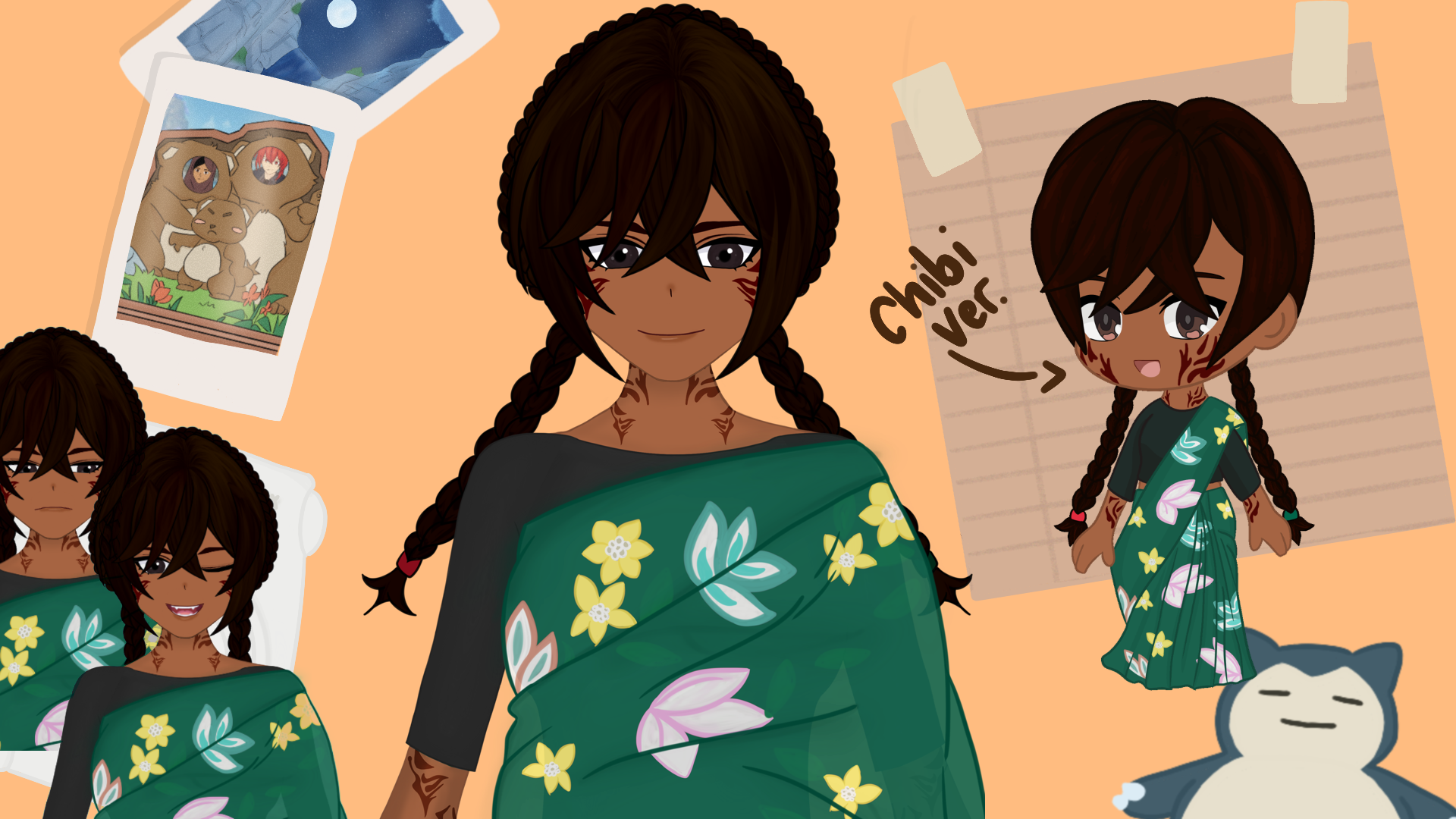
Here’s a short summary about her/ her lore:
Jahanara (Nara for short) was the first ever OC I ever made when I was nine years old. She is the main protagonist of my first-ever NaNoWriMo story. I used to post shorts on my blog before I took them down a few years ago. In my original fantasy manuscript, she is a cartographer who is forced to return to the seas when her village is flooded to escape the debt that was forced upon her. While I want to return to that manuscript one day, she is often the OC I use a lot as a self-insert. Turning her into a V-tube model was so much fun because it felt like I was truly bringing her to life.
Here is a highlight from one of the early streams I used to test her out. We were celebrating the anniversary of Genshin Impact and looking at my progress from the last year. Please excuse the mic. I’m using a cheap headset from Amazon, and today, the audio did not want to work with me.
As you can tell, there are a lot of buggy movements, and for some reason, I rigged the mouth smile wrong, so it always triggers when I talk normally instead of when I smile. I am also using my laptop camera to track my face, which isn’t recommended, but it’s the only option I have for now. But for a first-time attempt, I’m still super proud. I’ve learnt a lot from this, and I hope to make the second version of this model look more cleaner. The second version will still be Nara, but I’ll make some changes to the art style, so rigging the design won’t be so much of a hassle.
So, that’s it! That is all the resources I used to make my first V-Tube model; feel free to check me out on Twitch or join my discord to see updates on my second model. I will be taking my time making the second one, as the first one was made and rigged in a week, but I really hope to show the journey of making a new and improved model!
See you all soon with some bookish content!
 as told by zaheerah